
How to Build a Chat UI with Tailwind CSS
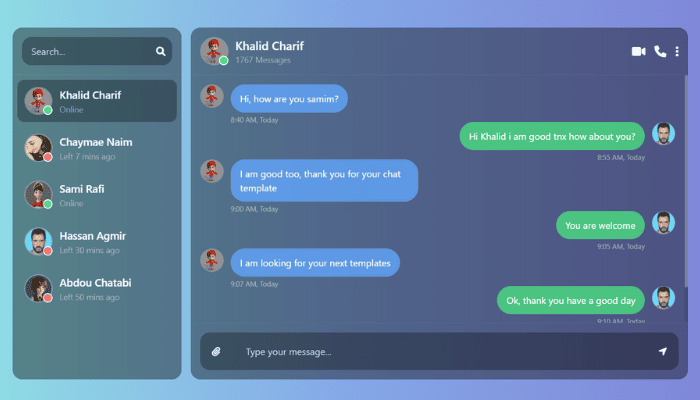
In today’s digital era, chat interfaces are an essential part of web applications, from customer service widgets to messaging apps. In this article, we’ll explore a beautifully designed chat UI created using Tailwind CSS, Font Awesome, and custom CSS. This project showcases how you can blend utility-first CSS with modern UI practices to build a sleek, responsive, and functional messaging layout.
💡 Technologies Used
- HTML5: For semantic structuring of the layout.
- Tailwind CSS: A utility-first CSS framework for styling.
- Font Awesome: For incorporating modern, scalable icons.
- Custom CSS: To enhance UX, especially with scrollbars and backgrounds.
🎨 Aesthetic and Layout
The UI is wrapped in a full-page container with a gradient background (linear-gradient(to right, #91EAE4, #86A8E7, #7F7FD5)), giving it a calm and modern feel. The design is split into two main sections:
1. 📱 Sidebar (Contacts)
This is a vertical panel occupying about one-fourth of the screen on larger devices and displays:
- A search input to filter contacts.
- A scrollable contact list, each with:
- Profile pictures.
- Status indicators (green for online, red for offline).
- User names and last activity timestamps.
Tailwind’s utility classes like rounded-xl, bg-opacity, and hover:bg-opacity-20 are used to enhance interactivity and visual appeal.
🔍 Notable Features
- The contact images have a status badge using absolute positioning.
- Scrollbar is custom-styled using ::-webkit-scrollbar pseudo-elements.
2. 💬 Chat Area
The main chat area expands to fill the rest of the screen and includes:
- Chat Header:
- Displays selected user information.
- Action buttons for video call, voice call, and settings (with a dropdown menu).
- A dropdown built using the group-hover technique for smooth display without JavaScript.
- Chat Body & Messages (not fully shown in the snippet):
- Should include message bubbles, timestamps, and delivery indicators.
- Likely scrollable to handle long conversations.
🛠️ Responsive and Clean Code
Thanks to Tailwind’s mobile-first approach and utility classes like w-full, md:w-1/3, and flex, the layout:
- Scales across devices.
- Ensures accessibility and readability.
- Separates concerns (structure via HTML, style via Tailwind/custom CSS).
🌐 Example Utility Classes Used:
Class Purpose
| backdrop-blur-sm | Adds subtle background blur.
| rounded-2xl | Smoothens the corners.
| hover:bg-opacity-40 | Enhances hover effect.
| truncate | Keeps long usernames clean.
| flex-1, min-w-0 | Responsive flex growth.
💡 Why Use Tailwind CSS for Chat UIs?
Tailwind speeds up development with:
- Rapid prototyping: No switching between HTML and external CSS files.
- Consistent design: Utility classes encourage reusability and uniform spacing.
- Customization: Easily extendable with your own theme or breakpoints.
📌 Final Thoughts
This chat UI design is a great starting point for building messaging platforms, support widgets, or social features within your web app. By combining Tailwind CSS, Font Awesome, and a touch of custom styles, you can create a professional and user-friendly interface without writing much traditional CSS.
You can further enhance it by adding:
- Real-time functionality with WebSockets.
- Backend integration using Laravel, Node.js, or Django.
- Message encryption and media attachments.
🔗 Explore, tweak, and enhance it to match your app’s unique personality! If you want the complete code or help extending this layout into a functional app, feel free to ask.
Would you like a downloadable version or a GitHub-ready version of this layout?